For medical-device commercial teams
Walk into launch review knowing what’s open.
A focused Excel workbook for tracking commercial deliverables, owners, evidence, and the decisions that still need a human review.
Original template · Fictional example · No email required for the sample
Northstar Mobile Cart · fictional example
Commercial launch overview
What needs attention?
4Critical open
8Total open
7Ready rows
Rep value storyIn progressOpen
Pricing handoffDoneReady
Launch reviewNot startedOpen
An illustration of the workbook summary. All sample details are fictional.
The job to be done
Turn scattered updates into a reviewable picture.
A launch meeting should focus on decisions. Use the board to bring the work, evidence, and unresolved gaps into one view before the meeting.
Assign the commercial work
Start with buyer insight, positioning, approved-claims ownership, rep training, pricing handoff, availability, and other starter rows. Add owners and dates.
Back up a completed row
Choose a status. A Done row needs an evidence name or authorized link; an N/A row needs a reason. The gate flags missing entries.
Bring gaps to the decision
Review critical open work, identify the next action, and record the meeting outcome and conditions on the separate decision record.
See the logic in context
What does “HOLD” actually mean?
In the fictional Northstar example, the pricing handoff has evidence, but rep training, the value story, inventory timing, and the review meeting still need work. The summary shows four critical rows open.
The workbook checks whether the record is complete. Your organization’s authorized reviewers decide what to do.
Northstar launch reviewHOLD
Pricing and quote handoffReady · evidence named
Rep value storyOpen · review wording
Training sessionOpen · schedule pilot reps
Delivery availabilityOpen · confirm window
Next conversation: Who owns the remaining four critical items, what evidence is needed, and when will the team reconvene?
Illustrative fiction. This is a business workflow example, not a device or regulatory assessment.Inside the file
Look at the board before you buy.
These images show the two board tabs. The download also includes an in-file guide and a separate decision record.
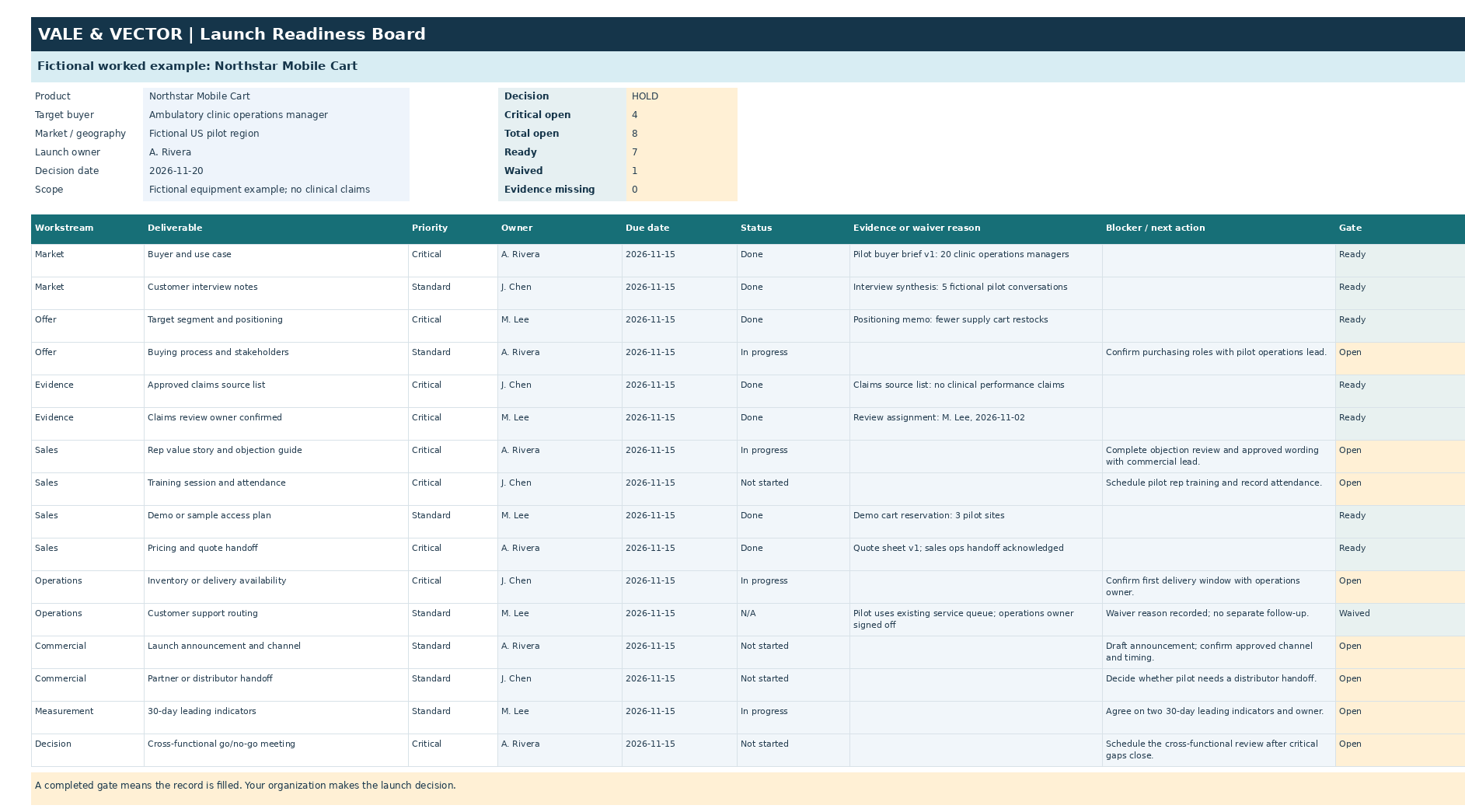
Fictional worked example · four critical rows remain openBoard preview · sample details are fictional
Download the one-page worked sample (PDF) ↗ No signup. A concise view of the example and gate logic.
The product
A small file built for a real meeting.
Desktop Excel is the intended format. The rows are a starting point you can edit for your own commercial workflow.
$29 one time
Availability detailsProposed test price. One purchasing organization may adapt the workbook internally. No subscription.
Questions before buying
Clear scope, fewer surprises.
Do I need desktop Excel?
It is the intended format. Other spreadsheet apps may import the file, but their formula and dropdown behavior has not been verified.
Can my team use it across launches?
Yes. One purchasing organization can duplicate and adapt the board for its internal launches. Public redistribution or resale of the template is not included.
Does it approve our launch or cover compliance?
No. It coordinates commercial work and record completeness. Your authorized teams determine clinical, quality, regulatory, legal, and final launch requirements in approved systems.
What support comes with it?
Download/setup issues receive a response within three business days. A reproducible formula defect reported within 30 days receives one corrected file. Custom launch planning is not included. The storefront’s policies and applicable rights govern refunds.
Does the workbook send data anywhere?
No macros or external connections are included. It is an editable local Excel file; you choose where to store it and whether to add links. Keep sensitive material in your organization’s authorized systems.
Prelaunch review
See the tool. Judge the fit.
The workbook and free sample are ready for review. Checkout is not live yet. Once the storefront is approved, this page will show a direct hosted checkout and delivery link.